Smart Appointment Reminders: From Notifications to Real Automation

Sellify Product Team
Engineering & Operations
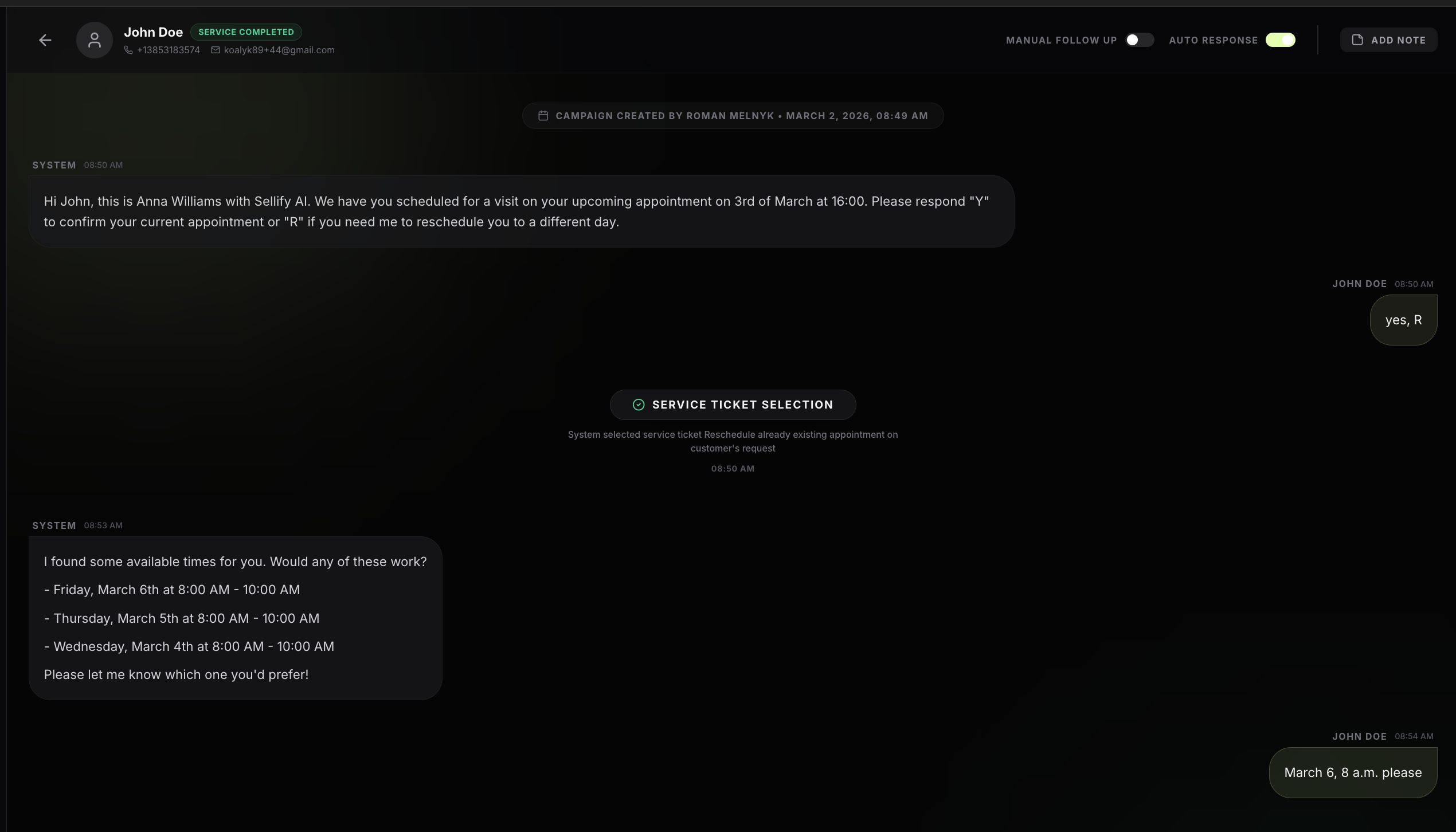
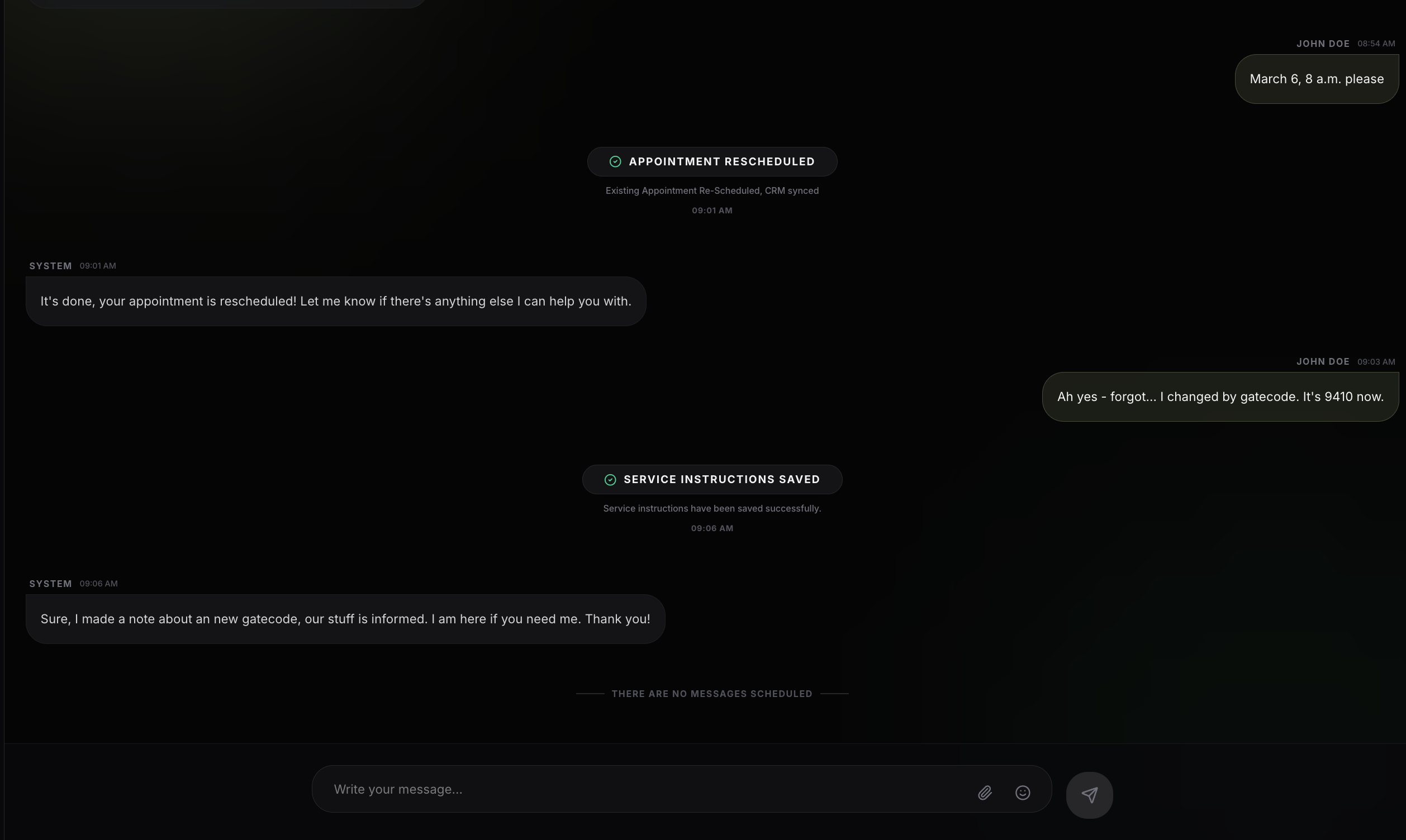
Appointment reminders are one of those features that almost every CRM claims to support. And technically, that's true. Most systems can send a reminder message before a scheduled visit.
But in practice, many pest control companies still struggle with:
- Missed appointments
- Last-minute cancellations
- Technicians arriving without preparation
- Office staff spending hours confirming
- Unresponsive text rescheduling
We built Smart Appointment Reminders in Sellify to solve this gap — not by sending more reminders, but by automating the entire confirmation, preparation, and rescheduling loop around appointments. This article explains how the feature works and why we approached it differently.
Why Appointment Reminders Matter More Than They Seem
A single missed appointment doesn't just mean lost revenue. It creates operational friction across the entire day:
- Route inefficiency for technicians
- Idle time between jobs
- Rescheduling overhead
- Customer dissatisfaction
- Increased workload for office teams
Research across service industries shows that properly implemented reminder systems can reduce no-shows by 30–50%. But the keyword here is properly implemented. The biggest issue we observed was not the lack of reminders — it was the lack of automation after the reminder was sent.
The Problem with Traditional CRM Reminders
Most CRM reminder systems follow a simple model: Pull upcoming appointments, send a message, ask to confirm, and wait. On the surface, this looks fine. But in reality, most reminders are little more than dummy notifications.
What's missing is the most important part: No one is proactively asking the customer what they need for the service. Do they have concerns? Is there a specific pest issue? Access information? Instructions for the technician?
Because this information isn't requested upfront, companies become reactive. Customers send random follow-up messages like "Gate code is 4821" or "Can we move this to Thursday?" which often get missed or require manual office intervention.
How Smart Appointment Reminders Work in Sellify
01Automatic Appointment Detection
Sellify continuously pulls upcoming appointments from your CRM based on configurable rules such as time before service (24h, 48h, same day), service type, and technician schedule windows. No exports or manual list creation are required.
02Conversational SMS Reminders
Instead of static notifications, customers receive interactive messages that encourage confirmation and gather critical data.
SMS Preview
"Hi John! Just a reminder — your pest service is scheduled for 3rd of March between 10–12. Reply Y to confirm or R if you need a different time."
03Real-Time CRM Synchronization
When the customer replies, Sellify automatically marks appointments as confirmed, updates statuses, and attaches notes to the job. This removes manual data entry for office staff and ensures technicians always see the latest information.
04Automated Rescheduling & Notes
Sellify processes rescheduling requests and updates the CRM automatically whenever possible, escalating to staff only when necessary. This significantly reduces inbound calls and administrative workload.
Operational Benefits We Designed For
Pricing: Flexible and Usage-Based
Smart Appointment Reminders are designed to be simple to adopt and scale. Pricing is usage-based, meaning you pay based on the number of reminder interactions processed rather than a fixed license fee.